Educators, facilitators and leaders
For those who run groups: teachers, social educators, collective facilitators and neighbourhood leaders. An afternoon of training with the whole kit and a first circle scheduled before leaving.
 a casa hacker initiative · digital inclusion
Free training in digital citizenship for those who educate and transform communities. A Casa Hacker initiative, with in-person training in five cities: Sumaré, Hortolândia, Nova Odessa, Campinas and Americana.

Sumaré · Hortolândia · Nova Odessa · Campinas · Americana
A free, step-by-step path to recover WhatsApp, Instagram, Facebook, Google, Apple and gov.br accounts — and why you should never pay a «hacker» to do it.
Signs that someone is watching your phone, your accounts or your location, how to check on Android and iPhone, and how to ask for help without putting yourself at risk.
Internet Segura is the Casa Hacker initiative that trains the people who already care for others to care also for what happens on the screen: social leaders, educators, teachers, facilitators and families who want to protect their communities and territories. The training is in person and free, and every participant leaves with the Educator's Kit to multiply the work.
The methodology comes from a years-long partnership with Tactical Tech, in Berlin, whose Data Detox Kit Casa Hacker has translated and adapted to Brazil since 2018, and from the handbook "Decifrando a Privacidade Digital", written with Proteka in 2021. Since then, more than seven hundred people have been through the trainings, from São Paulo to Ubatuba, including child-protection counsellors at Unicamp's Escola de Conselhos and educators from 23 organisations in the Campinas metropolitan region.
Banning doesn't educate. Educating protects. That sentence sums up the program's stance: the internet is not a dangerous place, it is the biggest public square that ever existed, and whoever cares for people has a duty to teach them how to cross it.
What worries this territory? Who is most exposed? Who already looks after this?
A circle with those who educate and those who care, to name the real risks and doubts.
In person, free, with group activities and phone in hand. Nobody leaves without changing one setting.
Everyone takes this handbook, the slide deck and the activity plans.
Those who were trained train others. Casa Hacker stays on call at falae@casahacker.org.
For those who run groups: teachers, social educators, collective facilitators and neighbourhood leaders. An afternoon of training with the whole kit and a first circle scheduled before leaving.
For those who receive the case when something has already gone wrong. Focus on recognising online violence against children and adolescents, preserving evidence and referring. Run with Unicamp's Escola de Conselhos.
Open circles at the community centre, the church, the association. Scams, passwords, screen time and the household agreement, phone in hand and with nobody having to show their own screen.
Schools, social organisations, collectives, councils, government departments and churches can receive an in-person Internet Segura training. Write to us saying who the audience is, how many people and where. We reply with a proposed date.
falae@casahacker.org
The full content of the trainings, for those who will teach it. Twelve chapters, eight activity plans, a slide deck and the promotional templates. Read it in order or go straight to what your territory needs.
licence cc by-sa 4.0 · copy, adapt and multiply, crediting casa hacker
The internet is not a dangerous place. It is the biggest public square that has ever existed, and anyone who looks after people has a duty to teach them how to cross it.
Nine in ten Brazilian homes have internet. In them, the child does homework on the phone, the grandmother receives her benefit through an app, the young person looks for a first job on a website, and the mother finds out from the street’s group chat that school let out early. The square, the counter, the notice board and the post office all ended up in the same device.
Nobody taught anybody how to live there. The TIC Kids Online survey, by Cetic.br, shows that more than two thirds of children and teenagers aged 9 to 17 already use social media, and that three in four use the internet for schoolwork. Almost half admit they can’t tell whether a piece of information found online is true. The adults who look after these children are not much better off: they learned on their own, in a panic, one scam at a time.
It’s worth saying this right away, because it’s the first thing the conversation about safety tends to forget. The internet is fantastic. It shortened the line at the health clinic, put the world’s library in your pocket and gave a voice to people who never had a microphone. Casa Hacker exists so that the periferia, Brazil’s working-class outskirts, gets to be in charge of this technology, and not the other way around.
Digital safety is not a list of fears. It’s the set of habits that lets a person use the internet with autonomy: knowing what is yours, knowing what you hand over in exchange, recognizing bait, checking before sharing, and knowing who to turn to when something goes wrong. People who know this browse more, not less.
Fear freezes. Know-how frees.
The law has already answered. The Marco Civil da Internet, Brazil’s internet bill of rights (Law 12,965/2014), says in Article 26 that the State’s duty to education includes training for the safe, conscious and responsible use of the internet as a tool for citizenship. The Estatuto da Criança e do Adolescente (ECA), Brazil’s Child and Adolescent Statute, applies on and off the internet. Law 13,185/2015 requires the prevention of bullying, including the kind that happens through a screen. And Law 15,211/2025, the ECA Digital, now requires platforms to verify age and provide for supervision by parents and guardians.
But the law doesn’t reach the territory on its own. What reaches it is the teacher, the neighborhood leader, the social educator, the collective’s facilitator, the member of the Conselho Tutelar, Brazil’s local child-protection council. These are people who already have the community’s trust and who see the problem before it becomes a police matter: the girl who stopped coming to the meetings, the boy who fell for a scam with his mother’s money, the WhatsApp group that spread a lie about a neighbor.
This kit was written for these people. You don’t need to be technical. You need to know how to talk.
Nobody’s job is a job nobody does. This one belongs to those who educate.
Taking away the phone, blocking the app and shutting down the network solves things for an afternoon. The next day the child is on a classmate’s phone, and now with nobody to ask. Strict control without conversation teaches kids to get around the rules, not to take care of themselves.
The path Casa Hacker learned over more than seven hundred people trained is a different one: first, listen to what worries that territory; then open a dialogue circle with those who educate and those who care; then train in person; and finally, leave in each person’s hands a material to carry on with. This kit is that material.
The chapters follow an order, but they don’t need to be read in sequence. The first three deal with what belongs to the adult: privacy, passwords and scams. It’s worth starting with them, because nobody teaches what they don’t practice. The next two, disinformation and well-being, are the ones that work best in a conversation circle. The chapters on cyberbullying, violence and what to do are there to consult when the problem shows up, and to read beforehand, so you’re not caught off guard. At the end come the law on one page, the activity plans by age, and the resources.
Each chapter closes with two blocks. To take to the community brings ready-made activities, tested in Casa Hacker’s trainings. To go deeper brings a few links, all checked. If one of them breaks, let us know at falae@casahacker.org.
This material belongs to Casa Hacker and is licensed under Creative Commons BY-SA 4.0: you may copy, print, adapt and redistribute it, as long as you credit the source and keep the same license. It was made to be multiplied.
Public, private and intimate. The footprint every click leaves behind. And the economy that makes "free" worth so much money.
Privacy is a right. It’s in the Constitution, in the Marco Civil da Internet, Brazil’s internet bill of rights (Law 12,965/2014), and in the Lei Geral de Proteção de Dados (LGPD), Brazil’s general data protection law. It’s also a culture: every family, every territory and every generation has a different idea of what you tell and what you keep. Security is something else. Security is the means, the set of tools and habits that guarantees the right. Mixing the two up makes the conversation start with the password and never get to the question that matters: what is mine, and what do I want other people to know?
In Casa Hacker’s trainings we use three boxes. Public is what poses no risk if everyone knows it: your name, your team, your city. Private is what needs care and choice: your address, your routine, the children’s school, the photo of Sunday lunch with the car’s license plate in the background. Intimate is what must stay protected, always: your body, your health, your password, the secret someone confided in you.
The same piece of information changes boxes depending on the person and the context. The time you leave the house is public to your neighbor and private to someone you don’t know. A bikini photo belongs in whichever box its owner decides, and nobody else gets a say. Teaching people to choose the box is more useful than teaching a list of prohibitions.
Privacy isn’t hiding. It’s choosing.
Everything you do online leaves a record. What you search for, how long you linger on a video, what you like at two in the morning, where your phone has been. That trail is your digital footprint, and it tells a story about you that is more complete than the one you would tell yourself.
For adults, this becomes digital reputation: the photo from ten years ago that shows up at the job interview, the angry comment the hiring process dug up. For children, it’s even more delicate, because they didn’t choose any of it. The photos parents have posted since the maternity ward, the report card celebrated in the family group, the funny video of the tantrum at the supermarket. The Sociedade Brasileira de Pediatria, Brazil’s pediatric society, has already called the excessive exposure of children by their own parents a form of abuse. That’s no exaggeration. That child will grow up and find all of it, and people with bad intentions may find it first.
This applies to educators too. Posting a photo of a student on a field trip, at recess or at a party, without the express permission of their parents or guardians, violates that child’s right to their own image. It’s common, it’s well-meaning, and it’s wrong.
What you post today is what someone finds tomorrow. Post for tomorrow.
A simple survey, done in every group: how many apps do you have on your phone? Most people guess thirty. The real count is over sixty. And how many of them did you pay for? None.
If the app is free, it makes money some other way, and that way is you. Every gesture on the screen becomes a data point. The data of millions of people becomes a detailed profile of what each one likes, fears, buys and intends. That profile is what gets sold: to whoever wants to sell you sneakers, and to whoever wants to sell you an idea. On broadcast TV, the commercials paid for the soap opera. Today, your data pays for the app.
The name for this is digital listening. Social networks are the best place in the world to listen, because there we only interact with what we like. Every like teaches the machine. After a while it knows how to suggest the product, the video and the course you didn’t yet know you wanted. It isn’t magic. It’s your own history handed back to you as an ad.
And it isn’t only ads. Political campaigns use the same data to decide what each person will see. The Data Detox Kit sums it up: the more a campaign knows about you, the more it can influence you, whether to donate, to change your vote or to stay home on election day. That’s how the Cambridge Analytica case worked, where a personality quiz on Facebook became a tool for targeted propaganda. Thinking as a collective, that is more serious than one more pair of sneakers in the cart.
Privacy isn’t solved in one go, but it gets better in ten minutes:
Each of these is a ten-second gesture. In a training, have the group do one of them right there, on their phones. One changed setting is worth more than an hour of warnings.
What you never hand over, nobody can leak.
The most hands-on chapter of all. One password per door, a second key, and the habit of checking whether yours has already leaked.
If privacy is choosing what goes out, account security is making sure nobody gets in. And the door to everything is email: whoever gets into it clicks “forgot my password” on every other service and changes everything in five minutes. Then comes WhatsApp, which today is a person’s identity in the eyes of their whole family, and the bank.
What’s behind those doors is what scammers want: credentials, card numbers, CPF (Brazil’s taxpayer ID number), address, phone number, email. With that, they open accounts, take out loans, ask relatives for money pretending to be you. This isn’t a problem for careless people. It’s a problem for everyone who has an account somewhere, which is to say, everyone.
In its trainings, Casa Hacker runs a contest: whoever builds the worst password in the world wins. Each person has fifteen points. Your own name is worth four. CPF or RG, two. The pet’s name, six. Date of birth, eight. Whoever spends all fifteen points wins. The room laughs, and then someone asks what all these pieces of information have in common. They are all on almost everyone’s public profile.
A weak password isn’t one with few letters. It’s one that can be guessed by someone who knows you, or by a program that tests the hundred thousand most common passwords in the country in under a minute. “123456”, “senha” (Portuguese for “password”), the name of your team, your child’s name followed by the year. All of them fall in the first second.
Long, unique and unexpected. That’s it.
Changing your password from time to time only makes sense when there’s a reason: a leak, a lost device, someone who had access. Changing for the sake of changing leads people to create predictable variations, and that’s worse.
One password, one door. One leaks, they all leak.
Two-step verification, or 2FA, asks for a second code in addition to the password: a number that arrives on your phone or that an authenticator app generates. With it turned on, whoever discovers your password is still locked out.
Turn it on for your email, your bank, your social networks and, first of all, WhatsApp. The cloned-WhatsApp scam is the most common in Brazil, and the app’s two-step verification stops it almost completely. It takes two minutes: Settings, Account, Two-step verification. In a training, have the group do it right there.
Prefer an authenticator app over a code by SMS whenever the service offers it. And keep the recovery codes on paper, at home. Without them, losing your phone can mean losing the account.
Take care of the recovery options too. Are the “recovery” email and phone number you registered years ago still yours? If not, whoever has them today can get into your account.
Almost certainly yes, and it’s nothing to be ashamed of. Big services leak lists of emails and passwords all the time. The site haveibeenpwned.com tells you which leaks your email has appeared in. It doesn’t keep what you type and is maintained by a respected security researcher.
If it shows up, change the password for that service and for any other where you used the same one. That’s why “unique” is the rule that matters most.
Nobody remembers sixty different passwords. You don’t have to. A password manager is a vault with a single strong master password; it creates and remembers the others for you, and fills them in when you log in. Bitwarden is free, open source and available in Portuguese, for phone and computer. KeePassXC keeps the vault on your own device, no internet needed.
For older people or anyone not at ease with apps, the little notebook kept in a drawer at home is an honest password manager. It’s far safer than the same password everywhere, which is the real alternative. The password thief is on the other side of the world, not in your drawer.
Security isn’t distrusting everything. It’s locking the door when you leave.
It is easier to fool a distracted person than to break into a system. This chapter teaches you to recognize the bait before you bite.
Nobody breaks into a bank. It’s hard, it’s expensive, and the security teams are big. It’s much easier to call a person saying you’re from the bank and ask them to confirm their password. The name for this is social engineering: manipulating people, not machines, to get information or money. Social engineering targets three things every human being has: haste, fear and goodwill.
That’s why nobody falls for a scam out of stupidity. They fall out of trust, on a busy day. Saying this at the start of the conversation takes the shame out of the room, and it’s shame that makes the victim hide the scam instead of telling someone, which only helps the scammer.
Change the channel, change the story, the structure is the same. Learn the structure and you’ll recognize the scam they haven’t invented yet.
The “virus that filmed you” scam is a perfect example: a message claims to have recorded the person on an adult website and threatens to send it to their contacts unless it gets paid. There is no video. There is fear, and fear pays.
Phishing comes from “fishing”: a fake email or website, looking like the real one, fishing for your data. When it arrives by SMS, it’s called smishing. By phone call, vishing: the “manager” who asks you to confirm a transaction, the “support” that needs to access your computer. When the scammer poses as the company director to fool an employee, whaling. You don’t need to memorize the names. You need to recognize that the bait is the same on any channel.
It’s the most common in Brazil and deserves its own section. It comes in three versions:
banco-seguro@gmail.com” is not the bank.A fake site copies the look of the real one and changes one letter in the address. Before typing a password or card number, read the address in the browser bar, letter by letter. Prefer to reach the site by typing the address yourself, or through the official app, instead of clicking a link you received. A padlock next to the address means the connection is encrypted, not that the site is honest: scammers have padlocks too. And pay attention to the browser’s warnings about unsafe sites. That’s what they’re there for.
Your child’s voice asking for money on a call, a video of the mayor announcing a fake benefit, the TV host selling a miracle cure. With artificial intelligence, the image and voice of any public figure can be imitated in minutes. The defense is the same as always: confirm through another channel, distrust urgency, and never make a decision about money in the heat of the moment.
When in doubt, don’t click. Type.
From concept to method. A five-question checklist, the agencies that fact-check for you, and the snowball effect of a single share.
It can be hard to separate fact from fiction when a video, an image or a text shows up on your screen. Personality quizzes that profile you, shocking headlines, doctored photos that convince you of a reality that doesn’t exist. What you see is not always what it seems, and the problem is not a lack of schooling. Researchers, doctors and journalists share false things too. The difference is the habit of checking.
In the communities where Casa Hacker works, disinformation is not an abstraction. It is the miracle cure sold in the neighborhood group, the rumor about the neighbor, the lie about the vaccine, the government benefit that doesn’t exist and the Pix transfer that “secures your spot”. It costs money, health and community life.
False or distorted information, produced or passed along with the purpose of confusing or misleading. It is not only fabricated “fake news”. Much of what circulates is half true: the real photo in a false context, the headline that doesn’t match the text, the satire taken seriously, the quote cut short. Researcher Claire Wardle organized it into seven types, and they are worth knowing because each one calls for a different check:
What they all have in common is the engine. Disinformation spreads because it stirs emotion, not because it is true. The more anger, fear or outrage a piece of content provokes, the faster it travels.
If you felt the urge to share it right away, that is your cue to wait.
Casa Hacker’s 2021 booklet organized verification into five blocks. It is still the best material to print and stick on the wall.
None of these questions requires being a journalist. They require a minute.
Brazil has serious, free fact-checking agencies: Comprova, Aos Fatos, Agência Lupa, Estadão Verifica, Agência Pública, E-farsas. Before sharing, search for the content’s headline in quotation marks. If it has already been debunked, it will show up. Some agencies take content for checking over WhatsApp.
For images, there is reverse search: sites like TinEye or Google Images show where a photo has appeared before. The photo of “yesterday’s flood” is usually from another country, another year.
Fact-checking is an enormous job and the teams are small. They prioritize what is most likely to go viral or cause harm. In other words: not everything will be checked by them. The rest is up to us.
Clickbait is the sensationalist, dishonest or invented headline made to provoke a click. The more attention a piece of content gets, the more ad money it makes, so the incentive is to lie beautifully. A deepfake is a video, audio or image altered by artificial intelligence to put words in someone’s mouth or swap a person’s face. Today anyone can make one in minutes.
Against both, the same remedy: visit the original source, check the author, look at the type of content (opinion? ad? news?), cross-check with other sources before taking it as true, and only then share.
And beware of personality quizzes: “which character would you be?” may be a carefully built questionnaire to harvest psychometric data. It was exactly this kind of quiz that got Facebook and Cambridge Analytica into trouble for profiling and targeting voters without consent.
Apps show you what you already like. That is algorithmic curation: the machine recommends based on your likes, views and shares. Over time, you only see people who agree with you, and you start to think the whole world thinks the same. Then any lie that confirms what you already believe walks right in.
The way out is to choose, on purpose, sources from outside your circle. Subscribe to services that gather news from diverse perspectives; Global Voices in Portuguese is a good start. Follow people you respectfully disagree with. A bubble doesn’t burst on its own.
If one person shares a piece of content with ten friends and each passes it on to ten more, in two steps it has reached a hundred people. In seconds. And there is no pulling it back or correcting it. Every person who shares is, in that instant, a newspaper editor with their own name on the front page. Worth asking first: would I put my name to this?
Whoever shares, publishes. And whoever publishes, answers for it.
Every color, sound and vibration was designed by entire teams to make you come back. Knowing that is the first step toward deciding when to come back.
According to studies, the average person looks at their phone more than 150 times a day. If we did anything else that often, we would see a doctor. Are we choosing to look that much? Or did someone choose for us?
The phone is fun and useful. It is also a powerful tool of seduction. Every feature, color and sound was optimized by teams of designers and psychologists to keep us connected and wanting more. It is not a conspiracy theory; it is the business model. The app is free and lives off ads. The longer you stay, the more ads you see. So everything in it is designed to make you stay.
Infinite scroll has no end because an end would be an invitation to leave. The little red notification dot uses the color of danger because danger is something we don’t ignore. The like and the “seen” work like a slot machine: an uncertain reward, sometimes it comes, sometimes it doesn’t, and it is precisely the uncertainty that brings you back. The next video starts on its own before you decide. The name for this is persuasive design, and there are very well-paid people working on it right now.
It is not a lack of discipline. It is design working against you.
In its trainings, Casa Hacker writes this question on a poster and lets the circle answer. The good answer is: no. Liking it is not a fault. The app was made to be likeable by people who understand the human brain. Feeling guilty only produces one more cycle of use: the person punishes themselves, gets distracted, goes back to the phone.
The question that sets you free is a different one: who profits from my time, and what do I want to do with it? When a person understands that their time is the product, the relationship changes. Not because they come to hate the phone, but because they start using it instead of being used.
Talk about this without judgment, because everyone in the circle will recognize themselves in at least one item. You included.
For children and adolescents, the subject has one more layer. The developing brain is more sensitive to uncertain reward, and social comparison on the networks weighs more. That is why the ECA Digital, Law 15,211/2025 (the digital update to Brazil’s Child and Adolescent Statute), now bans platforms from using minors’ profiles for targeted advertising and requires supervision mechanisms. The law recognizes what this chapter says: it is not just a matter of individual willpower.
Digital well-being is not throwing your phone away. It is taking back the choice. Each item below takes less than a minute:
In a training, ask each person to pick one item and do it right there. Turning off one app’s notifications is the easiest, and the one you notice most. The following week, ask who missed it.
Having a healthy relationship with technology is not a privilege for those with time for detox retreats. It is a right of every person and every territory, and that is why it is treated here as part of digital security, not as self-help advice. Those who educate can do two things: give people the vocabulary to name what is happening to them, and show them that the settings exist.
Use your phone. Don’t let your phone use you.
The difference between teasing and violence, the signs that show up before anyone reports it, and what the law requires of those who educate.
Bullying comes from “bully”, the tough guy who picks on others. It is a relationship of repeated intimidation, control and humiliation by a person or group over someone, meant to create the idea that there is something wrong or inferior about the victim. It happens in the schoolyard, on the bus, on the football pitch. Cyberbullying is the same thing through a screen, and the screen makes everything worse: there is no going home, the humiliation becomes a thousand in minutes, it stays recorded forever, and the aggressor doesn’t see the face of the person they hurt.
Brazil has the world’s fourth-largest population of digital natives. For children and adolescents, the internet is the main space where they live their social lives. It is where they make friends, fight, date and suffer. Those who educate need to be there too, at least with their attention.
The hardest question, and the most important. Children tease, adolescents roast each other, and not every joke is violence. Three criteria separate the two, and they apply to bullying and cyberbullying alike:
All three together are bullying. A funny photo edit posted once and deleted when the person asked is not. A group created to talk trash about someone, with screenshots of private conversations, is. The nickname the person accepts is everyday life; the nickname they asked to stop and that kept going is violence. Teaching this distinction to the adolescents themselves is half the job, because they can regulate themselves when they have the words.
A joke ends when the other person says stop. If it goes on, it has changed its name.
The victim rarely tells. They are ashamed, afraid of making it worse, or think it is their fault. Those who educate usually see the signs before the family does, because they see the person in the group:
No single sign proves anything. Several together call for a private conversation, without pressure: “I’ve noticed you seem different; I’m here.”
Law 13,185/2015, Brazil’s anti-bullying law, created the Program to Combat Systematic Intimidation. It defines bullying and cyberbullying and says that preventing them is a legal duty, not a favor. It establishes that institutions must train their staff, promote discussion and awareness campaigns, provide psychological, social and legal assistance to victims and aggressors, and record the cases. Schools must produce reports every two months. The law speaks of schools, but its spirit applies to any space that brings children and adolescents together: social project, church, collective, sports court.
On liability: from age 18 there is criminal liability. Between 12 and 18, the conduct is not a crime but an ato infracional, an infraction under the ECA (Brazil’s Child and Adolescent Statute), subject to its measures, from a warning to detention. And under article 932 of the Civil Code, parents are civilly liable for their minor children: whoever creates a fake profile to attack a classmate can generate damages that the family will pay. The internet is not a lawless land, and digital traces allow the police, the Ministério Público (the public prosecutor’s office) and the courts to reach those responsible.
Casa Hacker’s perspective, and that of the 2021 booklet this kit grew out of, is to prioritize mediation and social-emotional skills. Long before any report, and even during a legal process, the educational role is to prevent and mediate so that the harm is as small as possible.
In practice:
Cases involving risk to life, threats or any kind of physical aggression call for immediate notice to the police, the Conselho Tutelar (the local child protection council) or the Ministério Público, as the case requires. The chapter What to do has the step by step for preserving evidence and reporting.
Most people in a cyberbullying situation are neither victim nor aggressor. They are the audience. And the audience is bullying’s strength: without those who laugh, those who pass it on and those who pretend not to see, it doesn’t work. Teaching young people what to do as bystanders is what they can do on their own, without an adult: don’t pass it on, leave the group, report it on the platform, send the victim a private message, tell someone they trust.
Those who see and stay silent take part. Those who see and act put an end to it.
Nudity without consent is a crime, not pornography. The victim is never to blame. And those who educate have a duty to report.
Brazil has the world’s fourth-largest population of digital natives. For adolescents, the internet is the main public space of social life, and it is there that they live their first experiences, including romantic and sexual ones. Pretending otherwise protects nobody. What protects is the adult who knows what they are talking about and doesn’t judge before listening.
It is worth saying, first of all: exchanging intimate images can be a legitimate part of getting to know one’s own body, of exploring pleasure, of building trust between two people. That is not the subject of this chapter. The subject is what happens when that trust is broken, and what happens when an adult takes advantage of a child.
The most frequent case is intimate content leaked after a relationship ends. One of the parties, almost always the man or the boy, makes public images received in a relationship of trust. It is popularly called “revenge porn”, and the name hides what matters most: publishing intimate content without authorization is a crime, not a genre of pornography, even if the aggressor uses porn sites or pretends to offer sexual services in the victim’s name. Law 13,718/2018 made it a crime to share footage of sex or nudity without consent, and criminalized sexual harassment.
When it involves someone under 18, the act is even more serious: it is the production and sharing of images of a crime against the sexual dignity of a child or adolescent, a form of sexual violence. Pornography presumes voluntary participation between adults. Where there is a child or adolescent, there is abuse or exploitation, so these are not pornographic images; they are images of a crime.
The Child and Adolescent Statute (ECA), in articles 240 and 241, sets a sentence of four to eight years for whoever produces these images, three to six for whoever shares them, and one to three for whoever stores them, whether on a USB stick, a computer or a phone. Online harassment and luring can carry up to three years. This has a practical consequence many people ignore: receiving and keeping an adolescent’s intimate image, even “as evidence”, is also a crime. We will come back to this in the next chapter.
No circumstance makes the victim responsible for the exposure. It doesn’t matter whether they sent the photo, trusted the wrong person, had been drinking, or “should have known”. The person who shared it without consent is the only one to blame. This sentence needs to be said out loud, because blaming is what makes the victim go silent, and silence is what allows the exposure to continue.
The aggressor is to blame. Always.
Naming helps you recognize. The main risks children and adolescents face online, in the list Casa Hacker uses with partners:
Most of it starts outside the walls of any institution, and reaches those who educate through a change in the child’s behavior or a peer’s account.
Education and health professionals have a legal duty to report every case of violence or harm against children and adolescents, on or off the internet. Reporting is not “turning the adolescent in”. It is protecting them. The Statute is clear: it is everyone’s duty to watch over the dignity of children and adolescents, keeping them safe from inhuman, violent, humiliating or embarrassing treatment.
In practice, when a case comes in:
Sometimes, when the case involves two adolescents and there is no adult abuser, mediation and an educational resolution may be more effective than going to court. That assessment belongs to the team together with the families, never to the victim alone.
The Marco Civil da Internet (Brazil’s Internet Bill of Rights), in article 21, says that in cases of nudity or sex without authorization the victim (or their representative) can request removal directly from the platform, with no court order needed. If the platform, once notified, fails to remove the content diligently, it becomes liable for it. It is the fastest way to stop the exposure. Before requesting removal, record the address and the evidence, as the next chapter explains.
Even if on a smaller scale, there are many serious cases involving boys and men. Regardless of the gender or sexual orientation of the person exposed, this violence against intimacy and the body cannot be allowed to become trivial. If you receive content of this kind: don’t share it, report the link on the platform and delete it from your device. Don’t comment, don’t ask, don’t laugh. If you know the person, talk to them in private and offer concrete help. Circulation depends on each person who passes it on.
Breaking the chain is the one thing everyone can do. And it is the one that matters most.
The sequence to consult when the problem hits. Save the evidence, record it, block, report, and who to turn to in each case.
Anyone who has suffered cyberbullying, a scam or sexual violence online can report it and ask for help. The first piece of advice is the hardest to follow: don’t reply, don’t retaliate, don’t take justice into your own hands. That only escalates the violence and can turn the victim into a defendant. Victims under 18 need to be guided to ask a guardian or a trusted adult for help, and it is that adult who leads the steps below.
This chapter is meant to be consulted when the problem hits. Print it, stick it on the wall, save it on your phone.
Don’t delete anything. Not the content, not the conversations, however much it hurts.
These are the materials the authorities will have to move the report forward.
One exception almost nobody knows about, and it changes everything. When the content is sexual and involves someone under 18, only the victim or their legal guardians should hold those records. Possessing an intimate image of a child or teenager is the crime of storage, even if the intent is to “keep it as evidence”. The educator, however well-meaning, cannot save or forward that content without authorization. What the educator does is guide the family to keep it, and stay close.
With the evidence in hand, a notary’s office (cartório) can draw up an ata notarial, a notarized record: the notary checks the addresses and the content and certifies that the offense, intimidation or abuse existed, with that content, on that date. It is the notary’s official authority lending weight to the evidence, which counts for more than a loose screenshot when the case reaches court. It costs money; families without means can seek guidance on alternatives from the Defensoria Pública, the public defender’s office.
A simple and urgent step: the victim needs to stop receiving the abusive content. Block on every network and app, and leave the groups where the attack circulates.
Every platform has a reporting mechanism, and cyberbullying, threats and non-consensual nudity break the rules of every one of them. Report the post and ask for its removal. It’s free, immediate and often enough to stop the spread.
The Marco Civil da Internet, Brazil’s internet bill of rights, gives the victim of intimate exposure the right, in article 21, to demand removal directly from the platform, no judge needed; a platform that is notified and fails to act becomes liable. If reporting through the button doesn’t solve it, a lawyer can send an extrajudicial notice so the company formally takes notice and acts.
Depending on the severity, file a boletim de ocorrência, a police report. Children and teenagers can do so, accompanied, and so can anyone close to them. If your city has one, go to the police station specializing in cybercrime or the women’s police station; if not, any police station will take it. Many states have an online police station. Bring the evidence.
Google offers a form to ask that content stop appearing in search results tied to the victim’s name. This does not remove the content from the page where it is hosted, but it stops people searching for the person’s name from finding it. The form can be filled in by legal guardians, when the victim is a minor, or by lawyers. Google is not responsible for the content of websites, only for search, so it is essential to also try to contact whoever runs the page.
When guiding victims and families, insist on the support network: friends, family, the community itself and the spaces where the person spends their days. It helps them get through the moment and keeps worse situations, or tragic endings, from happening. If the victim shows that the suffering is more than they can bear, or struggles to get back into a routine, guide the guardians to seek professional help: psychologists, the local health service, the CAPS (Brazil’s community mental health centers).
When the case happens inside a group (a class, a collective, a project), it is vital to make the others aware of how serious it is, without exposing the victim, to avoid revictimization and stigma.
When the victim or the family wants to pursue legal action, gather all the documents above and go to the Defensoria or a lawyer. Sometimes, when the case involves only teenagers, mediation and an educational resolution can be more effective than a lawsuit; that is a decision for the family together with the team, with the victim heard.
If you receive content of this kind, don’t share it. Report the link and delete it from your device. Don’t ask the victim “why did you send it”. Under no circumstances should the victim be blamed.
The aggressor is to blame. Always.
The law, the year and what it asks of those who educate. No legalese, to consult and to cite.
The internet, like any other shared space, demands respect for human rights so that technology can help build a fairer society. These principles are written into law. Those who educate don’t need to be lawyers, but they do need to know that the law exists, what it asks and where to find it. That is what this page is for.
Marco Civil da Internet, Lei 12.965/2014. Brazil’s internet bill of rights, the “constitution” of the Brazilian internet. It guarantees privacy and freedom of expression, defines the responsibilities of platforms and, in article 26, states that the State’s duty regarding education includes building capacity for the safe, conscious and responsible use of the internet. It is the legal basis for this training. In article 21, it gives the victim of non-consensual intimate exposure the right to demand removal directly from the platform.
Estatuto da Criança e do Adolescente, Lei 8.069/1990. Brazil’s Child and Adolescent Statute, the ECA. All the rights and duties in the ECA apply online too. Children and teenagers have the right to the preservation of their image, privacy, identity, autonomy and ideas (article 17), and it is everyone’s duty to keep them safe from humiliating or embarrassing treatment (article 18). Since the 2008 reform, articles 240 and 241 criminalize producing, sharing and storing sexual images of children and teenagers. Teenagers who commit an act defined as a crime commit an ato infracional, a juvenile offense, and answer with socio-educational measures, from a warning to detention.
Lei 13.185/2015, the Program to Combat Systematic Intimidation. Defines bullying and cyberbullying and makes prevention a legal duty of institutions: train teams, promote discussion and campaigns, provide psychological, social and legal assistance to victims and aggressors, record cases and, in the case of schools, produce reports every two months.
Lei 13.718/2018. Amended the Penal Code to criminalize sexual harassment (importunação sexual) and the disclosure of scenes of rape, sex or nudity without consent. It is the law that answers the leaking of intimate images between adults.
Lei Geral de Proteção de Dados, Lei 13.709/2018. Brazil’s General Data Protection Law, the LGPD. Personal data may only be collected with a clear purpose and a legal basis, and people have the right to know, correct and delete. Children’s data requires a guardian’s specific consent. It applies to those who educate too: the attendance list with CPF numbers (the Brazilian taxpayer ID), the group photo, the project’s sign-up records are all personal data.
Código Civil, article 932. Parents are civilly liable for the minor children under their authority. Whoever creates a fake profile to humiliate a classmate can generate damages the family pays.
ECA Digital, Lei 15.211/2025. In force since March 2026, it creates specific rules to protect children and teenagers in the digital environment: age verification on platforms; guardian supervision, with linked accounts; immediate removal and notification of the authorities for content involving sexual exploitation, abuse, grooming and abduction; a ban on profiling minors and on directing commercial advertising at them.
Base Nacional Comum Curricular and Plano Nacional de Educação em Direitos Humanos. Brazil’s national core curriculum and its national plan for human-rights education. They are not criminal laws, but they guide the curriculum: critical thinking, responsibility, autonomy, respect for diversity, empathy and peaceful conflict resolution. Digital culture is a general competency of the BNCC. Anyone who needs to justify the training to management will find the argument here.
The law is in force, but much of its machinery depends on regulation by the ANPD (Autoridade Nacional de Proteção de Dados, Brazil’s data protection authority) and on implementation by the platforms. Casa Hacker’s recommendations for this period:
You don’t need to memorize law numbers. You need to know that, for every situation that reaches an educator, there is a law that covers it, and that digital traces let the police, the Ministério Público (the public prosecutor’s office) and the courts reach those responsible. Say that to victims, so they know they have someone to turn to. Say it to potential aggressors, so they know the screen doesn’t hide them.
The internet is not a lawless land. It’s a land with laws few people have read.
What makes the kit a kit. Ready-made plans, from age 6 to community leaders, for talking circles, classrooms, collectives, community activities and talks.
A booklet teaches the reader. A kit teaches the one who will teach. That is the difference, and it lives here: ready-made activity plans, written for whoever will be standing in front of a group, with a goal, duration, materials, a timed step by step, opening questions and variations.
The plans were written by Casa Hacker for this kit, drawing on what worked in the organization’s own trainings and on what earlier scripts taught us. They don’t depend on a website or a platform: paper, pen and a phone are enough. They work for a small-group talking circle, a classroom, a collective, a community activity in the street and a forty-minute talk.
Each plan states the age group it was designed for and the formats it works in. There are six age groups: 6 to 8, 9 to 11, 12 to 14, 15 to 17, adults and families, and leaders who will multiply. There are five formats: small-group circle, classroom, collective, open community activity and talk.
Use the filter to find what fits your situation. Each plan says which chapter of the booklet it connects to, so you can read it beforehand.
No plan was written for your territory. Before running one, swap the examples for the ones your community recognizes: the scam that went around the neighborhood, the app young people there use, the fake news that split the street’s group chat. The plan gives the structure. The local example gives the truth.
And after you run it, tell us about it. Three lines to falae@casahacker.org: what worked, what got stuck, what they asked that you couldn’t answer. That is how the next version of this kit gets better.
A good plan is one that survives contact with real people.
8 plans
The child realizes there are things you tell everyone, things you tell only people you trust, and things that stay just with them, and knows who to ask for help when someone asks for what they shouldn't.
This age group doesn’t need the word “privacy.” It needs three places: what we tell everyone, what we tell only at home, and what stays just with us. Talk about people, not screens. The screen comes in at the end.
1. The story (10 min). Tell, in your own way, the story of a character who had a magic backpack where they kept everything they knew: their name, the street where they lived, the photo from the pool, the tablet password, the secret a friend told them. One day the backpack opened in the town square and everything fell on the ground, and people started picking things up. Ask: what should they run to grab back? What can they let people see? Let the children answer before any explanation.
2. The three boxes (15 min). Introduce the boxes: the megaphone (you can tell everyone), the house (you tell the people we trust) and the heart with a padlock (stays just with me, and with whoever takes care of me). Hand out the cards. Each child chooses a box for their card and says why. When two children disagree, don’t decide for them. Ask the group. Tip: the pool photo usually sparks the best conversation.
3. What if someone asks? (10 min). Ask: what if a person you don’t know, in a game or on the phone, asks for something from the heart box? Build three answers with the group, and repeat them together out loud: “I can’t.” “I’ll ask the person who takes care of me.” “I’ll tell an adult I trust.” Ask each child who their adult is.
4. The drawing (5 min). Each child draws their own heart with a padlock and what they keep inside. They don’t have to show it. Whoever wants to, shows it.
A child who puts heart things in the megaphone without hesitation may be used to being very exposed. Don’t correct them in front of the group; talk to whoever takes care of them afterwards.
The child discovers how much you can learn about a person just from what they post, learns to separate what is safe from what exposes them, and understands that a profile can be fake.
Build the fictional profile carefully: innocent posts that, together, reveal too much. Example: “First day at my new school!” with the school’s front and name in the background; “Home alone until six, what freedom”; “My dog Thor in front of the house” with the door number visible; “Happy birthday to me, 10 years old!”; a screenshot of a favorite game with the username. No post on its own is serious. The whole is the point.
1. The case (5 min). Present the profile as that of a made-up child, called Bia for example. Say that the group is a team of detectives and the mission is to find out everything they can about Bia just by looking at the profile.
2. The investigation (15 min). In groups of three or four, with the magnifying glass and the detective’s file: name, age, where she studies, where she lives, when she is alone, what she likes, her username in the game. Walk around and prod: “can you tell the street?”, “can you tell the time?”.
3. The turn (10 min). Gather the files onto a poster. Ask: if Bia is a real child, who else can read this profile? Let the group reach the answer on its own. Then ask what Bia should have done differently in each post, and rewrite the captions with the group. The dog photo can stay; the door number can’t.
4. Does the person exist? (10 min). If there is internet, open the site thispersondoesnotexist.com and reload a few times. Every face was invented by a computer. Ask: how would you know if the person who messaged you in the game really exists? Build the rule: someone I don’t know in real life, I don’t know. An internet friend is an internet acquaintance.
5. My profile, my rules (10 min). Each child writes three rules for their own profile or for the game they play. Whoever wants to, reads them out. End with the question: who do you tell if a stranger messages you? Name the adults.
If a child says “this already happened to me” (a stranger messaged them, asked for a photo, asked for secrecy), welcome it right away, without fuss, and talk privately afterwards. The chapter on what to do has the steps.
The group learns to tell teasing from cyberbullying using three objective criteria, understands the role of those who watch and agrees on what to do when they see it happening.
In this age group teasing is language. If the activity starts by saying teasing is wrong, the group switches off. Start by acknowledging that joking exists, and that the problem is knowing where it ends.
Suggested cards: “a nickname the person likes and answers in kind”; “a nickname the person asked to stop and the group kept using”; “a funny edit of a classmate’s photo, posted once and deleted when he asked”; “a group created just to talk badly about someone in the class”; “a screenshot of a private conversation sent to the big group chat”; “tagging someone in an embarrassing photo every day”; “an argument with insults between two people who had a fight”; “a video of a classmate falling, reposted by half the class”.
1. The three criteria (10 min). Present the three signs. Bullying, on screen or off, is what has all three at the same time: intentional (meant to hurt), repeated (happens again) and unequal (one side has more people, more popularity or more reach). Give an example of each criterion on its own and ask whether it is bullying. A fight with insults between equals is not; it’s a fight.
2. Sorting (20 min). In groups of four, the cards are sorted: joking, violence or it depends. Each group presents one card they disagreed on internally. Don’t give a quick answer key; ask them to apply the three criteria out loud. The card with the argument between two people and the one with the deleted edit usually divide the room, and that’s great.
3. Why the screen makes it worse (10 min). Ask the group what changes when the teasing happens on the phone instead of the playground. Write it on the poster. Steer toward four points: there’s no going-home time; it turns into a thousand in minutes; it stays recorded; the one attacking doesn’t see the face of the one being hurt.
4. The audience (15 min). Ask how many people, in a cyberbullying situation in a group of thirty, are victim or aggressor. Two, three. And the other twenty-seven? Each person writes on a piece of paper one concrete thing they would do when they saw a classmate being humiliated in a group chat. Collect and read without saying who wrote what. Put together on the poster the “class agreement”: don’t forward, leave the group, report on the platform, talk to the person privately, tell a trusted adult.
5. Closing (5 min). Ask who would like to be the person who acts instead of the one who watches. End with the sentence: joking ends when the other person asks. If it continues, it has changed its name.
Nervous laughter or glances aimed at one specific person during the sorting are a sign that there is a case under way. Don’t point it out. Seek the person out afterwards, privately, and read the chapter on what to do.
The group notices its own bubble, learns to check a piece of content with five questions and does a real, live verification of something that circulated during the week.
Choose the content carefully: something that really circulated in the territory or in the young people’s networks that week, preferably already checked by a fact-checking agency, so that you know the answer. Avoid partisan electoral topics in this age group; it works better with health, scams, celebrities or a local rumor.
1. The quote (5 min). Show the quote “Life is the art of encounter, though there is so much missed encounter in life” signed by Clarice Lispector. Who has seen it before? Many. Tell them it is by Vinicius de Moraes, from Samba da Bênção. If a beautiful quote has circulated wrongly for years, what else circulates wrongly?
2. My bubble (15 min). Each person, on their own phone and without showing it, opens the feed of one social network and notes in silence: what are the first five pieces of content about? How many are from people who think like you? How many are from outside your circle? Collect impressions out loud, without details. Explain algorithmic curation: the app shows you what you already liked. Ask: who decides what you see? You or the machine?
3. The five questions (10 min). Present the checklist: author (who wrote it? are they an expert? do they have a reputation?), accuracy (are the photos real? do other sources say the same?), objectivity (is it complete or just a piece?), currency (when is it from?), coverage (does it explain in depth or is it just a headline?). One question each, per group.
4. Live fact-check (20 min). Present the chosen content. In groups of four, with phones, ten minutes to answer the five questions and reach a verdict: true, false, or out of context. Teach along the way: search the title in quotation marks, look it up on Comprova, Aos Fatos or Lupa (Brazilian fact-checking agencies), reverse image search. Each group presents its verdict and how it got there. Only then show the official fact-check.
5. Snowball and closing (10 min). One person “shares” a piece of paper with ten people, each of them with ten more. In two steps, a hundred. Ask them to try to get the paper back. End by building with the group a personal “stop phrase” for before sharing. Suggestion: “Would I sign my name to this?”
Young people who defend the false content even after the fact-check are not being stubborn; they are protecting their group’s identity. Don’t humiliate them. Go back to the question of who profits from it, and let the doubt do its work.
Each person leaves with a security setting done on their own phone, knows how to recognize the three versions of the WhatsApp scam and has an agreed stop phrase for the next suspicious call.
This is the plan for adults in the community at large: parents, grandparents, workers, people who go to the community center, the church, the neighborhood association. Many arrive embarrassed for having already fallen for a scam. Start by taking away the shame: nobody falls for it out of stupidity; they fall out of trust, on a busy day. Speak slowly, repeat, and do it on the phone together with them.
1. The worst password in the world (15 min). Announce the contest: whoever builds the worst password wins. Fifteen points: 4 for the name, 2 for the CPF (the Brazilian taxpayer ID number), 6 for the pet, 8 for the date of birth. People laugh and build. Then ask: how many of those pieces of information are in your profile, or on your Facebook, or on your front door? Conclude: a weak password is not the short one, it’s the one that someone who knows you can guess.
2. One password, one door (15 min). Explain the rule in one line: long, unique, unexpected. Show an example of a good password made of four unrelated words. Ask who uses the same password for everything. Many hands. Explain “one leaks, they all leak” and show, with your own email, haveibeenpwned.com. Offer the little notebook kept at home as an honest password manager for those who don’t want an app; for those who do, mention Bitwarden.
3. The second key, right now (20 min). Turn on WhatsApp two-step verification together with the group: Settings, Account, Two-step verification. Go from chair to chair. Ask them to write the PIN in the notebook. Those with a Gmail account do the same on their Google account, if there is time. One setting done is worth more than an hour of warnings.
4. Bait hunt (20 min). Show the real, anonymized scam. In pairs, two minutes to find the clues. Then build the list on the poster: urgency, authority, a link, a request for a code or money, a story too good or too scary. Present the three versions of the WhatsApp scam (“hi mom, I changed my number”, the six-digit code “sent by mistake”, the cloned profile) and the defense for each one.
5. Call back (15 min). Role-play in pairs: one is the “bank manager” calling to confirm details. The one who answers has only one task: to say “I’m going to hang up and call the number on my card”. Repeat with the “son who changed his number” and the “power company support line”. End by building, on the poster, the group’s stop phrases: “I don’t click, I type”, “I hang up and call back”, “I ask them to wait”.
6. Closing (5 min). Each person says out loud one thing they are going to do today. Ask who can teach what they learned to someone at home by the end of the week.
Those who refuse to turn on the second key are usually afraid of losing access, not lazy. Explain the PIN, write it down together, and show that WhatsApp asks for the PIN from time to time precisely so the person doesn’t forget it.
Families leave with a household agreement about screens, know why the child's photo on social media deserves a second question and know the way to ask for help if something happens to a child.
This is not a circle to tell parents what to do. It’s a circle for parents to say what they have already tried and what didn’t work, and to leave with an agreement they wrote themselves. Avoid the word “forbid.” Use “agree.”
1. Guess versus dashboard (15 min). Each person writes down how many hours a day they think they use their phone. Then they open the screen-time dashboard on their own device (Android: Digital Wellbeing; iPhone: Screen Time) and compare. Nobody shows theirs. Ask who was surprised. Say the sentence that changes the conversation: children copy what they see. The household agreement starts with the adult.
2. Is it your fault you like it? (10 min). Show the poster and let them answer. Explain persuasive design in two sentences: every color, sound and vibration was tested to make the person come back, and the longer they stay, the more ads they see. It’s not a lack of discipline; it’s design working against the family. This takes away the guilt and gives back the choice.
3. Your child’s photo (15 min). Ask who has already posted photos of their children. Everyone. Tell them, without judgment, what the Brazilian Society of Pediatrics says about excessive exposure and propose three questions before posting: will they be happy to find this at fifteen? Does it show the school, the street, the routine? Who, besides friends, can see it? Show where the privacy of posts is changed. Whoever wants to, changes it right there.
4. Signs and the way forward (15 min). Present in five minutes the signs that something is happening to a child online: isolation, a sudden change in phone use, poor sleep, fear of a particular group, sadness that doesn’t go away. Then, the path in one line: welcome without interrogating, keep the evidence without deleting, go to the Conselho Tutelar (the municipal child protection council) or Safernet (the Brazilian online-safety helpline), and never blame the child. Make it clear that the child will only tell if they know they won’t be punished for telling.
5. Our home agreement (15 min). Each family writes three agreements on the sheet, and one of them has to apply to the adults too. Suggestions, if they get stuck: phone out of the bedroom at bedtime; dinner without screens; a time of day when the child can ask for help with anything they saw on the internet without getting told off. Whoever wants to reads theirs.
6. Closing (5 min). Ask each family to stick the agreement on the fridge and come back to the circle next time to tell what happened.
Parents who react to step 4 with “that doesn’t happen in my house” are the ones who most need the printed sheet. Hand it over without insisting.
A group of community leaders, educators and facilitators leaves with a diagnosis of their own territory, a plan for a first conversation circle with a date set and a command of the kit's slide deck to run it on their own.
This is the training for those who will train others. It reproduces, in three hours, the path Casa Hacker follows in each city: listen to the territory, open the dialogue, train, leave the kit and multiply. Whoever runs it doesn’t need to be from Casa Hacker; they need to have done this activity once.
1. Why we are here (20 min). Open with the 150-times question and the town-square map exercise: what the internet has replaced in each person’s life over the last five years, and who taught them. Present chapter 0 and the structure of the kit in ten minutes, using the slide deck. Say the program’s motto: forbidding doesn’t educate, educating protects.
2. Territory diagnosis (40 min). In groups by neighborhood or by area of work, three posters: what has already happened here (scams, exposure, cyberbullying, rumors), who is most exposed (older people, children of what age, women, young people) and who already takes care of this (school, health clinic, church, collective, Conselho Tutelar, the municipal child protection council). Each group presents in three minutes. Bring it together on a single poster: this is the map of the territory, and it is what decides which chapter to start with.
3. The chapters the territory calls for (40 min). With the map on the wall, the group chooses the two or three most urgent chapters. Split the room: each subgroup reads the chosen chapter (fifteen minutes) and prepares, with that chapter’s slides, a five-minute presentation for the others. Watching colleagues present is what gives the confidence to present alone.
4. The first circle plan (40 min). Individually or in pairs, each person fills in the sheet: with whom (audience and how many), where, when (date), which activity plan from this kit they will use, what they need to bring, who invites, and a phone number for the local Conselho Tutelar and police station written in the footer. The date has to be within the next four weeks; a plan without a date is an intention.
5. Rehearsal (30 min). Three volunteers each run five minutes of an activity plan with the group acting as the audience. Feedback in two sentences per person: one thing that worked, one they would change. Whoever runs it learns more in the rehearsal than in the reading.
6. Network agreements (10 min). How the group will keep in touch (a messaging group will do), when it meets again to tell how the first circle went, and who writes to falae@casahacker.org with the report. Close by recalling the license: the kit is meant to be copied, adapted and redistributed.
The sheet from step 4 is the product of the afternoon. Those who leave without a date set rarely put it into practice. If someone can’t set a date, ask what’s missing and solve it right there: sometimes it’s just the space, and someone else in the room has one.
A large, mixed audience leaves knowing what is private, what bait looks like, how to check before sharing and who to turn to, and with one action done on their own phone.
A talk is not a class. It’s a sequence of questions with three or four strong answers and one action at the end. Choose beforehand the slides you will use: from the whole deck, this script uses about twenty. Test the projector. Find out who is in the audience (older people? parents? young people? community leaders?) and adjust the examples.
0 to 5. The question. Opening slide. How many times a day do you pick up your phone? Ask for guesses out loud. Reveal the 150. Say who you are in one sentence and why you agreed to lead this conversation.
5 to 12. What is yours. Privacy slides: the three boxes and the glass bathroom. Ask the audience which box the time a person leaves home goes in. Let them disagree. Close with “privacy isn’t hiding, it’s choosing”.
12 to 20. The bait. Project the real scam from the region. Ask the audience to shout out the clues. Mark each one on the bait slide: urgency, authority, link, request, story. Present the three versions of the WhatsApp scam and the defense for each one. Stop phrase: “when in doubt, don’t click; type”.
20 to 27. Check before sharing. The Clarice Lispector quote that is actually by Vinicius. The five questions, handed out on paper. If there is time, a live fact-check of a piece of content from the week, on the projector. Close with “whoever shares, publishes”.
27 to 33. When it goes wrong. Slides on what to do: the eight steps on one screen, the “don’t be a bystander” and the list of who to turn to with the local phone numbers. State clearly the one exception many people don’t know: sexual content involving anyone under 18, only the victim or their guardian keeps it.
33 to 38. The action. Ask everyone to take out their phone and do one thing, right now: turn on WhatsApp two-step verification (Settings, Account, Two-step verification). Guide them step by step. Those who finish help the person next to them. It’s the most remembered moment of the talk.
38 to 40. Closing. “Forbidding doesn’t educate; educating protects.” Where the guide is (casahacker.org/internetsegura), how to request a training for your territory (falae@casahacker.org), and that everything can be copied and multiplied.
Questions. Set aside ten to twenty minutes. The most common questions and the short answers: “my grandson doesn’t listen to me” (then make the household agreement together with him, not for him); “I fell for a scam, what now?” (bank first, police report afterwards, and no shame); “what about TikTok?” (the same as for all of them: set up privacy, talk about what they see, and the ECA Digital, Brazil’s new digital child protection law, now requires more from the platforms).
If someone comes to you afterwards to tell a personal story, don’t solve it in the hallway. Welcome it, take down a contact, and arrange a private conversation. The chapter on what to do is your script.
Kits, tools, fact-checking agencies, films and where to report. Every link checked, with one line saying what it's for.
Everything below was checked in September 2026. Whatever no longer responded was dropped. If a link breaks, let us know at falae@casahacker.org.
The ways Casa Hacker uses to bring the topic to the territory, and that any group can copy: printed educational material (this booklet will do); an exhibition with posters in the square, at the school or at the community center; training other educators with this kit’s slides; one-on-one guidance and mentoring for whoever comes with a case; and debate circles through the lens and context of the territory itself.
This kit belongs to Casa Hacker and is licensed under Creative Commons BY-SA 4.0. Copy, print, adapt and redistribute. Credit the source and keep the license. It was made to be multiplied.
Teachers, public managers, community leaders, social workers — and also students, families and communities. The project is open to people of different ages and levels of knowledge.
Nothing. The training is in person and free, in the five cities of the initiative.
The digital handbook with the full content of the trainings, on this page: twelve chapters, activity plans by age group, a slide deck to train other educators, and flyer and poster templates. CC BY-SA 4.0 licence: copy, adapt and multiply.
Write to falae@casahacker.org — the initiative grows city by city, together with schools, organisations and territories.
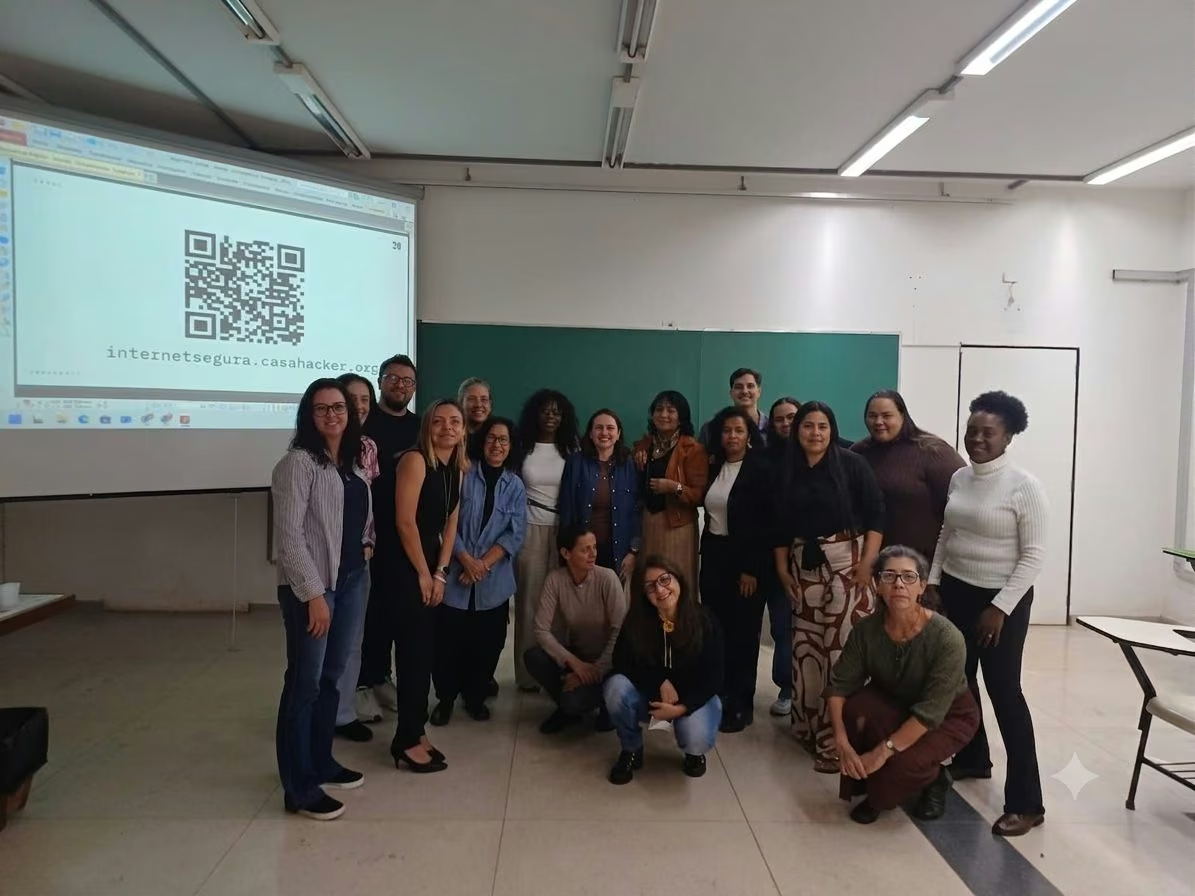
On 3 July 2026, Casa Hacker took part for the third time in the training programme of the Escola de Conselhos of Unicamp, leading a session on Digital Safety for Children and Adolescents.

Casa Hacker and Desktop launch Internet Segura: Formação de Educadores — free, in-person training in digital security for teachers and community leaders in Campinas and Sumaré, in November 2025.
Accessibility provisions are made on individual request. Ask for what you need — Libras interpreting, audio description, physical accessibility, individualised support, priority service and others.
Ask at least 15 days in advance: with that notice we can guarantee it; with less, we will make every effort but cannot promise.